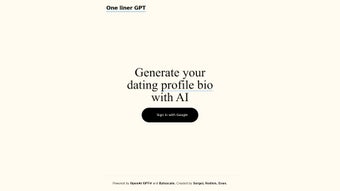

Download OneLiner – AI‑Powered Dating Profile Bio Generator
Overview
OneLiner is a web‑based AI writing assistant built specifically for the online dating world. Launched on January 9 , 2024, the platform harnesses the power of OpenAI’s GPT‑V model together with Bytescale’s scalable infrastructure to turn a handful of personal details into a compelling dating‑profile biography. Users simply sign in with their Google account, fill out a short questionnaire about their interests, tone preference, and relationship goals, and let the AI craft a narrative that feels authentic and attention‑grabbing.
The service positions itself as a free, secure, and instantly available tool that removes the guesswork from profile creation, helping members of Tinder, Bumble, Hinge, and other dating apps stand out in a crowded marketplace. While OneLiner focuses exclusively on dating bios, its underlying technology can adapt to a variety of writing styles, from witty one‑liners to more heartfelt introductions. The platform’s streamlined sign‑in process, coupled with an intuitive web interface, makes it accessible on any device with a modern browser.
Although it currently lacks multi‑language support and deep customization sliders, its core promise—delivering a personalized, AI‑generated bio in seconds—resonates strongly with users seeking a quick confidence boost before swiping right.
Key Features & Benefits
- AI‑Driven Bio Generation: Utilizes GPT‑V to analyze user inputs and produce a unique, narrative‑style biography that matches the desired tone.
- Google Single Sign‑On: Fast, secure authentication eliminates the need for separate passwords.
- Instant Results: Bios are generated in under 15 seconds, allowing users to update their profiles on the fly.
- Personality Matching: The algorithm matches phrasing and content to the user’s stated interests, hobbies, and relationship preferences.
- Responsive Web Design: Works seamlessly on Windows, macOS, Android, and iOS browsers without the need for a downloadable app.
- Privacy‑First Architecture: No personal data is stored permanently; inputs are processed in‑memory and discarded after generation.
- Free Tier with Unlimited Bios: Users can generate as many bios as they need without hitting a paywall.
Beyond the feature list, OneLiner delivers tangible benefits that enhance a user’s dating experience. By removing the mental block associated with “what should I write?”, the tool saves time and reduces anxiety, especially for those new to online dating. The AI’s ability to mirror a user’s voice—whether playful, sincere, or adventurous—helps maintain authenticity, a key factor in attracting compatible matches.
Moreover, the free‑forever model means that anyone can experiment with different bios to see which version yields higher response rates, effectively turning the platform into a low‑risk A/B testing lab for personal branding. The secure, cloud‑based processing ensures that sensitive personal details never linger on the server, aligning with modern privacy expectations. While the lack of multilingual support may limit non‑English speakers, the core offering remains robust for the majority of English‑speaking dating markets.
Installation, Compatibility & How to Use OneLiner
OneLiner is a pure web application, which means there is no traditional installation process. To get started, visit the official website from any modern browser (Chrome, Edge, Safari, or Firefox). The first step is to click the “Sign in with Google” button; this triggers OAuth authentication, granting the service a secure token that never reveals your password. Once logged in, you’ll be presented with a clean dashboard containing a short questionnaire. Fill in fields such as:
- Age and gender
- Top three hobbies or interests
- Preferred tone (e.g., witty, sincere, adventurous)
- Relationship goals (casual, long‑term, friendship)
After submitting the form, the AI processes the data and returns a ready‑to‑copy bio within seconds. Users can copy the text directly into their dating app profile or use the “Regenerate” button to receive alternative versions. The interface also includes a “Save” feature that stores the generated bios locally in the browser’s cache, allowing quick retrieval without re‑entering details.
OneLiner is fully compatible with Windows 10/11, macOS 12 and newer, Android 9 and newer, as well as iOS 13 and newer. Because it runs in the cloud, performance depends only on internet speed, not on device horsepower. The responsive design adapts to both desktop monitors and mobile screens, ensuring a consistent experience whether you’re at home or on the go. For users who prefer privacy, the platform offers an “Incognito” mode that disables any caching and forces a fresh generation each time, further safeguarding personal information.
Pros & Cons, FAQ & Final Verdict
Pros
- Fast, AI‑generated bios in seconds.
- Free unlimited usage with no hidden fees.
- Secure Google sign‑in and privacy‑first data handling.
- Responsive design works on all major operating systems.
- Tailors tone and content to user‑provided preferences.
Cons
- No multi‑language support – English only.
- Lacks deep customization sliders for specific word counts or style nuances.
- Dependent on an internet connection; offline use not possible.
- Currently a web‑only tool – no native desktop or mobile apps.
Frequently Asked Questions
Is OneLiner really free?
Yes, OneLiner offers a completely free tier that allows unlimited bio generations. There are no hidden subscription fees, and premium features are not required to use the core service.
How does OneLiner protect my personal data?
All user inputs are processed in memory and are not stored on the server after the bio is generated. Google OAuth handles authentication, so your password never touches OneLiner’s servers.
Can I use OneLiner on my phone?
Absolutely. The platform’s responsive design works on Android and iOS browsers, giving you the same functionality as on a desktop computer.
What if I don’t like the generated bio?
OneLiner includes a “Regenerate” button that instantly creates a new version based on the same inputs. You can iterate until you find a bio that feels just right.
Will OneLiner work without an internet connection?
No. Because the AI processing happens in the cloud, an active internet connection is required for bio generation.
OneLiner delivers on its promise of quick, personalized dating bios. The AI’s ability to capture a user’s voice while staying concise makes it a valuable addition to any online‑dating toolkit. While the lack of multilingual options may be a drawback for non‑English speakers, the free, secure, and fast nature of the service outweighs this limitation for the majority of users.
Conclusion – Should You Download OneLiner?
If you’re looking for a hassle‑free way to upgrade your dating profile, OneLiner is a solid choice. Its AI‑powered engine, free unlimited usage, and secure Google sign‑in combine to create a seamless experience that saves time and boosts confidence. Although it currently supports only English and lacks a native app, the web‑based platform works flawlessly across Windows, macOS, Android, and iOS browsers. Give OneLiner a try today and transform a bland bio into a conversation starter that reflects the real you.
Ready to stand out? Download OneLiner now and start generating compelling dating bios instantly!



.png)



